Saturday, October 31, 2009

When Technical Support Fails You – UPDATE and Answers!

As promised and update on what has happened so far. A correction needs to be made. the P800 is a PCIe 1.0 card so the bandwidth is cut in half from 4GB/sec to 2GB/sec.

My CDW rep did get me in contact with an HP technical rep who actually knew something about the hardware in question and its capabilities. It was one of those good news, bad news situations. We will start with the bad news. The performance isn’t off. My worst fears were confirmed.

The Hard Disks

The HP Guy (changing the names to protect the innocent) told me their rule of thumb for the performance of the 2.5” 73GB 15K drives is 10MB/Sec. I know what you are thinking, NO WAY! But, I’m not surprised at all. What I was told is the drives ship with the on board write cache disabled. They do this for data integrity reasons. Since the cache on the drive isn’t battery backed if there was any kind of failure the potential for data loss is there. There are three measurements of hard disk throughput, disk to cache, cache to system and disk to system. Disk to cache is how fast data can be transferred from the internal data cache to the disk usually sequentially. On our 15k drive this should be on average 80MB/sec. Disk to system, also referred to burst speed, is almost always as fast as our connection type. Since we are using SAS that will be close to 250MB/sec. Disk to system is no caching at all. Without the cache several IO reordering schemes aren’t used, there is no buffer between you and the system, so you are effectively limited by the Areal Density and the rotational speed of the disk. This gets us down to 10 to 15 megabytes a second. Write caching has a huge impact on performance. I hear you saying the controller has a battery backed cache on it, and you would be right.

The Disk Controller

The P800 controller was the top of the line that HP had for quite a while. It is showing its age now though. The most cache you can get at the moment is 512MB. It is battery backed so if there is a sudden loss of power the data in cache will stay there for as long as the battery holds out. When the system comes back on the controller will attempt a flush to disk. The problem with this scheme is two fold. The cache is effectively shared across all your drives since I have 50 drives total attached to the system that is around 10.5 megabytes per drive. Comparable drives ship with 16 to 32 megabytes of cache on them normally. The second problem is the controller can’t offload the IO sorting algorithms to the disk drive effectively limiting it’s throughput. It does support native command queuing and elevator sorting but applied at the controller level just isn’t as fast as at the disk level.If I had configured this array as a RAID 6 stripe the loss of performance from that would have masked the other bottlenecks in the controller. Since I’ve got this in a RAID 10 the bottleneck is hit much sooner with fewer drives. On the P800 this limit appears to be between 16 and 32 disks. I won’t know until I do some additional testing.

Its All My Fault

If you have been following my blog or coming to the CACTUSS meetings you know I tell you to test before you go into production. With the lack of documentation I went with a set of assumptions that weren’t valid in this situation. At that point I should have stopped and done the testing my self. In a perfect world I would have setup the system in a test lab run a series of controlled IO workloads and come up with the optimal configuration. I didn’t do as much testing as normal and now I’m paying the price for that. I will have to bring a system out of production as I run benchmarks to find the performance bottlenecks.

The Good News

I have two P800’s in the system and will try moving one of the MSA70’s to the other controller. This will also allow me to test overall system performance across multiple PCIe busses. I have another system that is an exact duplicate of this one and originally had the storage configured in this way but ran into some odd issues with performance as well.

HP has a faster external only controller out right now the P411. This controller supports the new SASII 6G protocols, has faster cache memory and is PCIe 2.0 complainant. I am told it also has a faster IO processor as well. We will be testing these newer controllers out soon. Also, there is a replacement for the P800 coming out next year as well. Since we are only using external chassis with this card the P411 may be a better fit.

We are also exploring a Fusion-io option for our tempdb space. We have an odd workload and tempdb accounts for half of our write operations on disk. Speeding up this aspect of the system and moving tempdb completely away from the data we should see a marked improvement over all.

Lessons Learned or Relearned

Faced with the lack of documentation, don’t make assumptions based on past experiences. Test your setup thoroughly. If you aren’t getting the information you need, try different avenues early. Don’t assume your hardware vendor has all the information. In my case, HP doesn’t tell you that the disks come with the write cache disabled. They also don’t give you the full performance specifications for their disk controllers. Not even my HP Guy had that information. We talked about how there was much more detailed information on the EVA SAN than there was on the P800.

Now What?

Again, I can’t tell you how awesome CDW was in this case. My rep, Dustin Wood, went above and beyond to get me as much help as he could, and in the end was a great help. It saddens me I couldn’t get this level of support directly from HP technical support. You can rest assured I will be giving HP feedback to that effect. By not giving the customer and even their own people all the information sets everyone up for failure.

I’m not done yet. There is a lot of work ahead of me, but at least I have some answers.You can bet I’ll be over at booth #414 next week at PASS asking HP some hard questions!

Friday, October 30, 2009

Heading back to Seattle

I love visiting Seattle, even in November. Getting to catch up with old friends and meet new people is always the highlight of my trip. Don’t get me wrong, the training is awesome and I always learn so much, but I am a social creature. I can always go to specific training events to hear Kalen or Itzik. Getting to meet them in a social setting is something else all together. I learn as much talking to as many of the 2000 people there as I do attending sessions. Never underestimate the wisdom of the crowd!

I’m also a bingo square, if you aren’t playing SQLBingo shame on you! It is another great way to meet some smart people and expand your circle of friends.Even if you aren’t playing still come and find me, I’m always willing to meet new people.


See you next week!

When Technical Support Fails You

I have had the pleasure of being a vendor, and technical support for both hardware and software products. I know it isn’t easy. I know it isn’t always possible to fix everything. The level of support I’ve received from HP on my current issue is just unacceptable. This is made more frustrating by the lack of documentation. The technical documents show capacity. How many drives in an array, Maximum volume size but nothing on throughput.Every benchmark they have seems to be relative to another product with no hard numbers. For example, the P800 is 30% faster than the previous generation.

I’m not working with a complicated system. It’s a DL380 G5 with a P800 and two MSA70’s fully populated with 15k 73GB hard drives. 46 of them are in a RAID 10 array with 128k stripe. Formatted it NTFS with a 64k block size and sector aligned the partition. Read/Write cache is set at 25%/75%. This server originally just had one MSA70. We added the second for capacity expansion and expected to see a boost in performance as well. As you can probably guess, there wasn’t any increase in performance at all.

Here is what I have as far as numbers. Some of these are guesses based on similar products.

P800 using two external miniSAS 4x connectors maximum throughput of 2400 MB/sec (2400Mbit per link x 4 per connector x 2 connectors).
The P800 uses a PCIe x8 connection to the system at 4,000 MB/Sec (PCIe 2.0 2.5GHz 4GB/sec each direction).
Attached to the controller are 15k 73GB 2.5” hard drives 46 of them for a raw speed 3680 MB/Sec of sequential read or write speed (23x80MB/sec write sequential 2 MSA70's RAID 10 46 Drives total based on Seagate 2.5 73GB SAS 15.1k)

Expected write speed should be around 1200 megabytes a second.

We get around 320 MB/Sec sequential write speed and 750MB/sec in reads.

Ouch.

Did I mention I also have a MSA60 with 8 7.2k 500GB SATA drives that burst to 600MB/sec and sustain 160MB/Sec writes in a RAID 10 array? Yeah, something is rotten in the state of Denmark.

With no other options before me I picked up the phone and called.

I go through HP’s automated phone system, which isn’t that painful at all, to get to storage support. Hold times in queue were very acceptable. A level one technician picked up the call and started the normal run of questions. It only took about 2 minutes to realize the L1 didn’t understand my issue and quickly told me that they don’t fix performance issues period. He told me to update the driver, firmware, and reboot. Of course none of that had worked the first time but what the heck, I’ll give it the old college try. Since this is a production system I am limited on when I can just do these kinds of things. This imposed lag makes it very difficult to keep an L1 just sitting on the phone for five or so hours on hold while they wait for me to complete the assigned tasks. I let him go with the initial action plan in place with an agreement that he would follow up.Twice I got automated emails that the L1 had tried to call and left voicemails for me. Twice, there were no voicemails. I sent him my numbers again just to be on the safe side. Next, I was told to run the standard Array Diagnostic Utility and a separate utility that they send you to gather all the system information and logs, think a PSSDiag or SQLDiag. After reviewing the logs he didn’t se anything wrong and had me update the array configuration utility. I was then told they would do a deeper examination of the logs I had sent and get back to me. Three days later I got another email saying the L1 had tried to call and left me a message. Again there was no voicemail on my cell or my desk phone. I sent a note back to the automated system only to find the case had been closed!

I called back in to the queue and gave the L1 who answered my case number, he of course told me it was closed. He read the case notes to me, the previous L1 had logged it as a network issue and closed the case. If I had been copying files over the network and not to another local array I can see why it had been logged that way. I asked to open a new case and to speak to a manager. I was then told the manager was in a meeting. No problem, I’ll stay on the line. After 45 minutes I was disconnected. Not one to be deterred, I called back again. The L1 that answered was professional and understanding. Again, I was put on hold while I waited for the manager to come out of his meeting. About 10 minutes later I was talking to him. He apologized and told me my issues would be addressed.

I now had a new case number and a new L1. Again, we dumped the diagnostic logs and started from the beginning. This time he saw things that weren’t right. There was a new firmware for the hard drives, a new driver for the P800, and a drive that was showing some errors. Finally, I felt like I was getting somewhere! At this point it has been ten days since I opened the previous case. We did another round of updates. A new drive was dispatched and installed. The L1 did call back and actually managed to ether talk to me or leave a message. When nothing had made any improvement he went silent. I added another note to the case requesting escalation.

That was eight days ago. At this point I have sent seven sets of diagnostic logs. Spent several hours on the phone. And worked after hours for several days. The last time I talked to my L1, the L2’s were refusing to accept the escalation. It was clearly a performance problem and they don’t cover that. The problem is, I agree. Through this whole process I have begged for additional documentation on configuration and setup options, something that would help me configure the array for maximum performance.

They do offer a higher level of support that covers performance issues, for a fee of course. This isn’t a cluster or a SAN. It is a basic setup in every way. The GUI walks you through the setup, click, click, click, monster RAID 10 array done. What would this next level of paid support tell me?

My last hope is CDW will be able to come through with documentation or someone I can talk to. They have been very understanding and responsive through this whole ordeal.

Thirty one days later, I’ve still got the same issue. I now have ordered enough drives to fill up the MSA60. The plan is to transfer enough data to free up one of the MSA70’s. Through trial and error, I will figure out what the optimum configuration is. Once I do I’ll post up my findings here.

If any of you out there in internet-land have any suggestions I’m all ears.

Wednesday, October 21, 2009

Fundamentals of Storage Systems – The System Bus

In my last post The Basics of Spinning Disks we covered hard drives, the back bone of our IO system.

This installment we will cover what connects the controller to the computer.

Disk controllers use a system bus to talk to your CPU and memory. It also determines the maximum speed your disk can talk to the computer. There may be as many as six different system busses in your computer. We are only interested in the ones that directly connect your disk controllers.

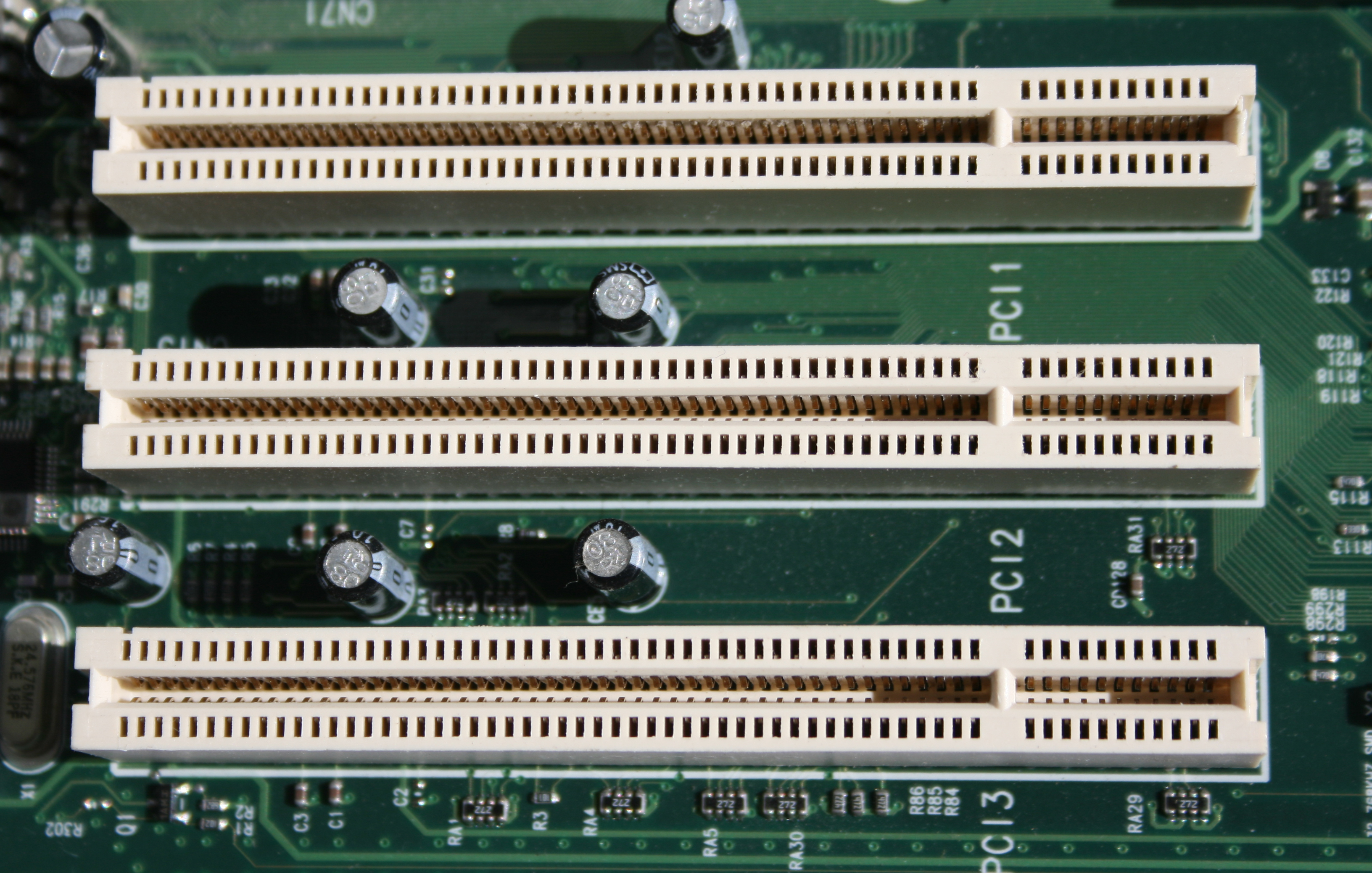
The oldest bus still in general use is PCI. You can still find them in your desktop and in servers though it is really on the way out. We are only covering PCI 2.0 32 bits wide running at 33 MHz. This allows for a theoretical top speed of 133.33 MB/Sec. In reality after overhead and other limitations you end up around 86 MB/Sec throughput. A single modern disk can achieve this speed. You generally don’t see PCI disk controllers with more than 4 ports. Adding more disk controllers to a system may not yield a direct increase in performance. Even if you have multiple PCI slots, they may only actually run through a single PCI bus. Limiting your bandwidth to the system to 133.33 MB/Sec.

File:PCI Slots Digon3.JPG

Credit:Jonathan Zander

IBM, HP, and Compaq came together to standardize a faster bus for servers, specifically for disk controllers and network interface cards. PCI-X build on the PCI standard and was backwards compatible. It extended the PCI bus to 64 bits wide and a speed of 66 MHz in its initial launch. We go from 133.33 MB/Sec to 533.3 MB/Sec, a 4x improvement. The next generation brought us two more implementations, PCI-X 64 bit/100 MHz and PCI-X 64 bit/133 MHz at 800 MB/Sec and 1067 MHz respectively. This was a major step up but had several flaws. The physical size of the connector was huge. It also carried over the shortcomings of PCI. Signal noise across slots, errors could be caused by having several cards next to each other. Communication was half-duplex bidirectional, It couldn’t send and receive data at the same time. You are only as fast as the slowest card on the bus, If you had a 66 MHz card your 133 MHz card was reduced to match.

Yikes!

File:64bitpci.jpg

Credit: Snickerdo

We have moved on to a completely new standard, PCI Express (PCIe). Some people confuse PCI-X with PCIe, but they are completely different. The new PCIe standard was introduced in 2004 and was quickly adopted in main stream computers for video cards, but  it is a general system bus. There are several key differences between PCIe and the buses that came before it. It is a fully serial and bidirectional bus, you can have multiple cards at multiple speeds reading and writing data at the same time. It also introduced the concept of lanes. PCIe card will use between 1 to 16 lanes. Each lane in the 1.0 specification was rated at 250 MB/sec. The 2.0 specification introduced in 2007 doubled that to 500 MB/Sec. In 2011 the 3.0 Specification will double that again to 1 GB/Sec. PCIe is also rated by how many transfers a second it can handle. Measuring transfers in Gigatransfers or Megatransfers has been around for a while, though not commonly used. See Gigatransfers at Wikipedia for a better explanation. One thing to be aware of the 1.0 and 2.0 standard loose speed due to the way data is encoded on the bus. Like the PCI bus, the 250 MB/Sec is a maximum you won’t see in the real world. You will loose about 20%. The 3.0 specification reduces that to around 1.5%. The most common sizing of PCIe slots is 1x, 4x, 8x, and 16x. It is also downwards compatible so a 1x, 4x, and 8x card will all work in a 16x slot. Just because a card is physically a 16x it may be a 8x or slower internally. That applies for the slot as well, it may be a 16x slot but only operate at 8x speeds.


File:PCIExpress.jpg

Credit: Snickerdo

PCI Express slots (from top to bottom: x4, x16, x1 and x16), compared to a traditional 32-bit PCI slot (bottom).

So, what does all this mean? If you have an older server, don’t use the PCI slots. Be careful with the PCI-X cards and placement. If you have PCIe you need to know if it is a 1.0 or 2.0 capable and what speed the physical connectors actually operate at.

Now that we have a basic understanding of how things connect to the computer we will cover disk controllers in the next installment!

Hardware Review – EVGA UV Plus+ 16

This isn’t exactly related to SQL Server. I did effect my productivity. I am a monitor junkie. I love multi-monitor setups and have had them for a very long time. Today, having two monitors is trivial. Almost every video card on the market supports two displays. If you want more than that you have to ether step up to a professional graphics card, which can be very expensive, or add another video card to your system. On my rig at home two video cards isn’t a problem I’ve got multiple PCIe slots and run two cards for a four monitor setup. My workstation at work only has one PCIe slot and a PCI slot. Getting a modern card using PCI is harder and harder.

I did some digging and found a card that wouldn’t break the bank and should work with my primary card without having two sets of drivers so everything looked good. I slotted the card in and powered up the computer. Not only did I not have anything on my third display, my network card dropped out too! So, I tried several other older PCI cards to no avail. I knew there were other adaptors out that connected a display via USB. Last time I had checked they were very expensive and didn’t work all that well. I made a trip down to my local Fry’s store. There I saw something truly amazing. Not only did they have USB to VGA they had USB to DVI, and they were under 100 bucks! I settled on the UV Plus+ 16 since it would do 1650x1080 with 32 bit color. The price was right at 60 bucks.

image

The UV Plus+ 16 is based on the Display Link DL-160 chip. Several other manufacturers also have adaptors based on ether the DL-160 or DL-120 and should be similar in performance and installation. The DL-120 doesn’t support the higher resolutions that I needed to run my 22” monitors.

What You Get

Out of the box you get everything you need.

image

This thing is small! I was also expecting something that wasn’t in the package, a power supply. You know, one of those lovely wall warts that take up way to much space. To my surprise, the UV Plus gets its power directly from the USB port. They include a carry case for the adaptor but not the USB cable or the DVI to VGA adaptor. To me this makes the case useless. The unit is sturdy and shouldn’t have any issues floating around in my laptop bag when I travel. The name, why Plus+? One plus not good enough? It is going to be hard selling these on eBay. “I give the Plus+ an A+++++.”

Installation

Installing the adaptor is simple.

  1. Install the drivers
  2. Plug it in using the supplied USB cable
  3. Attach Monitor
  4. Adjust settings via windows display properties or tray utility.

That’s it.

Once installed changing the options is just like working with any other monitor attached to your system.

image

If you don’t want to go that route you can always use the try icon control application that comes with it.

image

image

I actually moved the UV Plus to power a monitor I have that rotates from portrait to landscape since the tray utility handles it so well.

There are other benefits to running these adaptors. You can have six, yes six attached to a single system. Unless you are running an Nvidia card then you are limited to four adaptors. This is going to allow me to move up to six displays and remove the second video card in my primary workstation at home. With the free PCIe slot I’m putting in a hardware RAID controller, you can never have enough IO!


Experience So Far

Has been pretty uneventful, generally it just works. I did have an issue with opening a PDF from inside adobe reader in full screen mode. The display became corrupted with blocks and color bands. I just used the tray tool to turn off the display then back on and it was fine again.

Conclusion

The UV Plus+ 16 is EXACTLY what I needed. It is cheap, easy to use, and small. All of these things add up to a solid little device with lots of possibilities. If you need a multi-monitor setup for work this is a great solution for you. If you need a multi-monitor setup for gaming then you need to go with the right PCIe video card setup.

About Me

I’m Wes Brown, currently serving as Chief Database Architect for eScan Data Systems http://escandatasystems.com and as happy as I’ve ever been in my professional career.
Over the past decade or so I’ve been focused on enterprise systems and SQL Server in particular. That isn’t to say that’s all I’ve ever done just the thing that has brought me to this point in my professional career. 

I am also involved in building accelerators for SQL Server through another company that my friends and I are currently working to grow, Nitrosphere http://www.nitrosphere.net.

If that wasn’t enough I still maintain a private consulting company Planetary DB http://www.planetarydb.com that I use to build tools and give paid advice not directly associated with ether eScan or Nitrosphere!

I’ve also had the privilege to work with some outstanding companies and people along the way including Quest Software (litespeed product manager and SQL Server domain expert) and GoldenGate Software (SQL Server domain expert and professional services) that you may know as a database professional. Other companies like The SCOOTER Store (yes if they prequalify you, and you are turned down by Medicaid they will give you your scooter or power wheelchair) where I got to hone my SQL skills to a fine point.

Through all that I’m also active in the SQL Server community mostly on a local level running the Austin, TX PASS chapter CACTUSS http://www.cactuss.org for the last 5 years I think, time has a way of playing tricks on your memory.  I also started the San Antonio PASS chapter SALSSA http://www.salssa.com which is now in the capable hands of Jim Steiner.

And now I’m finally starting a blog in earnest. I’m always finding out things about technology and SQL Server that make me go “WOW! I never knew that.” As I find them I’ll post them up there is a chance you may not remember or didn’t know it ether. These little mysteries are what drive my passion to learn more and share with others.

Monday, October 12, 2009

Adventures in SQL CLR and C#

I’ve toyed with the CLR in SQL Sever 2005 off and on since the first Yukon beta had it enabled. And I’ll be honest with you, I was not a fan.It wasn’t like “YOU got chocolate in my peanut butter!” kind of moment for me. I really thought it was going to be a disaster of biblical proportions. As SQL Server DBA’s we caught a break, adoption wasn’t exactly stellar. The problem was there are enough restrictions and little gotchas to keep developers from whole sale abandoning Transact SQL for something more familiar. Fast forward a few years and now I’m not so scared.My biggest worry back then was memory usage. I’m still not very comfortable with it, but on a 64-bit platform you can mitigate those issues by adding more memory. On a 32-bit platform you could cause all kinds of damage by squeezing the lower 4GB memory space to the point you could have connection and backup failures due to lack of memory. Oh and the fix is usually restarting SQL Server. An example of this comes directly from http://msdn.microsoft.com/en-us/library/ms131075.aspx 

Scalable Memory Usage

In order for managed garbage collection to perform and scale well in SQL Server, avoid large, single allocation. Allocations greater than 88 kilobytes (KB) in size will be placed on the Large Object Heap, which will cause garbage collection to perform and scale much worse than many smaller allocations. For example, if you need to allocate a large multi-dimensional array, it is better to allocate a jagged (scattered) array.

88KB!

This memory thing is serious.

The other biggie is what you can, or cannot do using the CLR.

Again from MSDN http://msdn.microsoft.com/en-us/library/ms131047.aspx

SAFE is the most reliable and secure mode with associated restrictions in terms of the allowed programming model. SAFE assemblies are given enough permission to run, perform computations, and have access to the local database. SAFE assemblies need to be verifiably type safe and are not allowed to call unmanaged code.

UNSAFE is for highly trusted code that can only be created by database administrators. This trusted code has no code access security restrictions, and it can call unmanaged (native) code.

EXTERNAL_ACCESS provides an intermediate security option, allowing code to access resources external to the database but still having the reliability guarantees of SAFE.

Most restrictive to least restrictive permissions. Something you don’t worry about in general as a C# programmer but in the database its always an issue in some way.

What it boils down to:

If you are just talking to SQL Server using basic C# stuff leave it in SAFE which is the default.

If you need access to the file system or the registry and some other limited stuff EXTERNAL_ACCESS is the way to go.

IF you want to have the ability to completely tank a production SQL Server UNSAFE puts it all into your hands. You can call unmanaged code via P/Invoke, all bets are off.


Some additional light reading on what libraries can and can’t be called in the CLR.

http://msdn.microsoft.com/en-us/library/ms403273.aspx

Fun stuff, no Finalizers or static fields, read-only static fields are ok though. You will see why this is important to me a little later on.

http://msdn.microsoft.com/en-us/library/ms403279.aspx


T-SQL vs. CLR

The other thing I had been promoting, and not always correctly, is putting complicated math functions in CLR. Generally, I’ve found that most math problems run faster in the CLR over native T-SQL. And I’ve found for the most part that holds true for the core algorithm. Once you add data retrieval into the mix things shift back in T-SQL’s favor for a lot of operations. Like everything else, test your ideas using real world scenarios or as close as you can before deciding on one technology over another. I prime example for me was coding up Pythagorean and Haversine equations for the classic distance between two zip codes in T-SQL and C# via CLR. Running test data through an array in the C# solution it ran rings around the T-SQL function I had coded up but once it had to start pulling and pushing data back to the database the T-SQL solution was the clear winner.

Another aspect where the CLR can be much better is string manipulation. I’ve written a couple of small UDF’s to handle some of this since using the LIKE ‘%’ would cause a table scan anyway the CLR UDF was faster internally when dealing with the string than T-SQL was using all the string handling functions.

I’m also seeing quite a bit on using the CLR for rolling aggregates and other kinds of aggregation problems. I don’t have any personal experience in that yet with the CLR.

There are also some things that aren’t practical at all using T-SQL, some would say you shouldn’t be using the database for some of this stuff in the first place but that is an argument for a different post.


And Now for Something Completely Different…

I’ve recently started working on my most complex project using the CLR, some aspects have been covered by other folks like Adam Machanic, Robin Dewson and Jonathan Kehayias but there was some specific requirements that I needed.

Thus was born….

SQL Server File System Tools

This is a codeplex hosted project and all the source code is available there for your viewing pleasure.

I’ve done a lot of C# stuff but this was my first hard core CLR app for SQL Server.

What the assembly does is pretty simple, store files in the database ether native, encrypted or compressed.Yoel Martinez wrote up a nice UDF that does blob compression using the CLR. Between this and examples in Pro SQL Server 2005 on storing files in the database I knew I could do what I needed to do.

The wrinkle in my project was not just reading the file and storing it compressed it was putting it back on disk compressed as well. Enter #ziplib (SharpZipLib). This library allows you to pretty easily create standard zip files that even Windows Explorer can open and extract from. So with all the bits in place I set out to build my little tool.


Development Cycle

The first thing I did was put together all the samples I’d found build them up as a set of stored procedures instead of UDF’s and just got the file in and out working. Next I added compression via C#’s DeflateStream to see what it would take to get the data flowing in and out and what the performance hit in memory and time would start looking like. At this point I was pretty optimistic I could knock this thing out in a day or two tops. That was all fine and dandy until I started integrating the #ziplib library. My initial goal was to have the assembly set to EXTERNAL_ACCESS since that was the most restrictive security model.

Since the guys that wrote #ziplib didn’t have the CLR in mind there are several things that break without UNSAFE set. As I mentioned earlier the use of finalizers and static fields were the two big ones. I will at some point recode those parts but for now they are still in place. The second thing is the library covers a lot more functionality that I actually need, So I’ve removed the bits I can without refactoring the library. The resulting DLL isn’t horribly big at this point but I figure when I get around to coding up the finalizers I’ll refactor down to what I need then. One big plus for me though is #ziplib is all managed code written in C# so it is pretty easily added directly into my DLL so I don’t have to register two assemblies or call down to the file system to a unmanaged DLL. Compression is handled by RijndaelManaged which is a built in .net 2.0 libraries.

The big downer for me was trying to debug the the code in Visual Studio 2008, when it did work it was ok but It would fail to connect or fail to register the assemblies so I just fell back to injecting debug messages and running tests manually in SSMS.

One thing I really like about programming languages like C# is method overloading, I really wished you could do that with stored procedures! Since I can’t there were only two options, a stored proc that had lots of flags and variables that may or may not be used and handle it all under the covers or just build each option into a proc with simple callers and a descriptive name. I voted for option two. Some of the T-SQL procedures are used internally by the CLR procedures while all the CLR procedures are called by the user.

Here is the list procedures and what they do.

Called by CLR procedures as helpers

InsertFile
Is called by every proc that inserts a file into the database.

SavePassphrase
Called by StorePassPhrase to handle insert into database.

RetrievePassPhrase
Called by any proc that has to decrypt a file stream

RetrieveFile
Called by any proc that retrieves a file from the database

Called by Users

T-SQL Procedures

InsertTag
Called by User supplying a file id and list of key words or “tags” as a search helper other than file name.


RetrieveFileDetails
Get details on a single file or every file stored in the database.

CLR Procedures

StorePassPhrase
Give it a password and it generates a secure hash stored into the database for symmetric encryption

Below all store a file from the file system into the database.
StoreFile
StoreFileEncrypted
StoreFileCompressed
StoreFileEncryptedCompressed

Below all retrieve a file from the database back to the file system.
ExtractFileToDisk
ExtractFileToDiskEncrypted
ExtractFileToDiskCompressed
ExtractFileToDiskEncryptedCompressed

Below all retrieve a file from the database but returns a record set with the file name and the BLOB data.
ExtractFileToRecord
ExtractFileToRecordEncrypted
ExtractFileToRecordCompressed
ExtractFileToRecordEncryptedCompressed


And lastly, I put in an xp_getfiledetails clone since I wanted a way to verify the file is on disk and get attributes it seemed pretty straight forward since I’m getting the same details when i write the file to the database anyway.


Final Thoughts

This project isn’t done yet. there are a few more things to be added other than the code cleanup I mentioned already.

Off line decryption tool so the files dumped to disk still encrypted can be worked with.

Additional stored procedures for searching for files by tag or by attributes like name, size, etc.

A real installer and not a zip file with T-SQL scripts.

After that it goes into maintained mode with no new features but work on speeding it up, reducing the memory impact and fixing any bugs that are found. I really want to avoid this growing into a huge library, Keep it simple, do one thing and do it well.

Resources

Here are some things that helped me along the way.

Development Tools

Visual Studio 2008 
could have used notepad but hey I’m getting lazy in my old age.

JetBrains ReSharper 4.5
If you are using Visual Studio ReSharper is a must. I feel like I’m programming the the stone age without it.

GhostDoc
Free tool to help you document your C# code using XMLDoc. Yet something else I wished I could do with stored procedures

Doxygen
If you are building documentation and have XMLDoc in your code this can make it easier to gather it all together. It isn’t perfect but it is free.

Books

Both solid text Pro SQL Server 2005 has a chapter on CLR

Pro SQL Server 2005


This one is dedicated to just CLR and was also invaluable to me.

Pro SQL Server 2005 Assemblies


On The Web

http://www.sqlclr.net
Devoted to the CLR with some nice resources.


http://www.twitterbuttons.com
My Twitter buddies are always there to answer a question or two!